Galaxy File Sources Architecture
Learning Questions
What are File Sources in Galaxy?
How do user-defined file sources work?
What is the difference between File Sources and Object Stores?
Learning Objectives
Understand the File Sources plugin architecture
Learn about user-defined file source templates
Understand fsspec and PyFilesystem2 base classes
Learn about OAuth integration for cloud services
The Problem & Solution
Problem
Galaxy needs to read and write files from diverse sources
Before file sources, each backend required core code changes and there was no extensibility for new storage types
Plugin Architecture
FilesSourceinterface for all backendsBaseFilesSourcereference implementationConfiguredFileSourcesorchestrates plugins (lib/galaxy/files/__init__.py)FileSourcePluginLoaderdiscovers plugins (lib/galaxy/files/plugins.py)
Applications
Upload dialog, rule builder, collection creation, etc.
History & workflow import/export.
Directory tools.
Core Abstractions

Three interfaces: SingleFileSource, SupportsBrowsing, FilesSource
URI Routing & Plugin Scoring
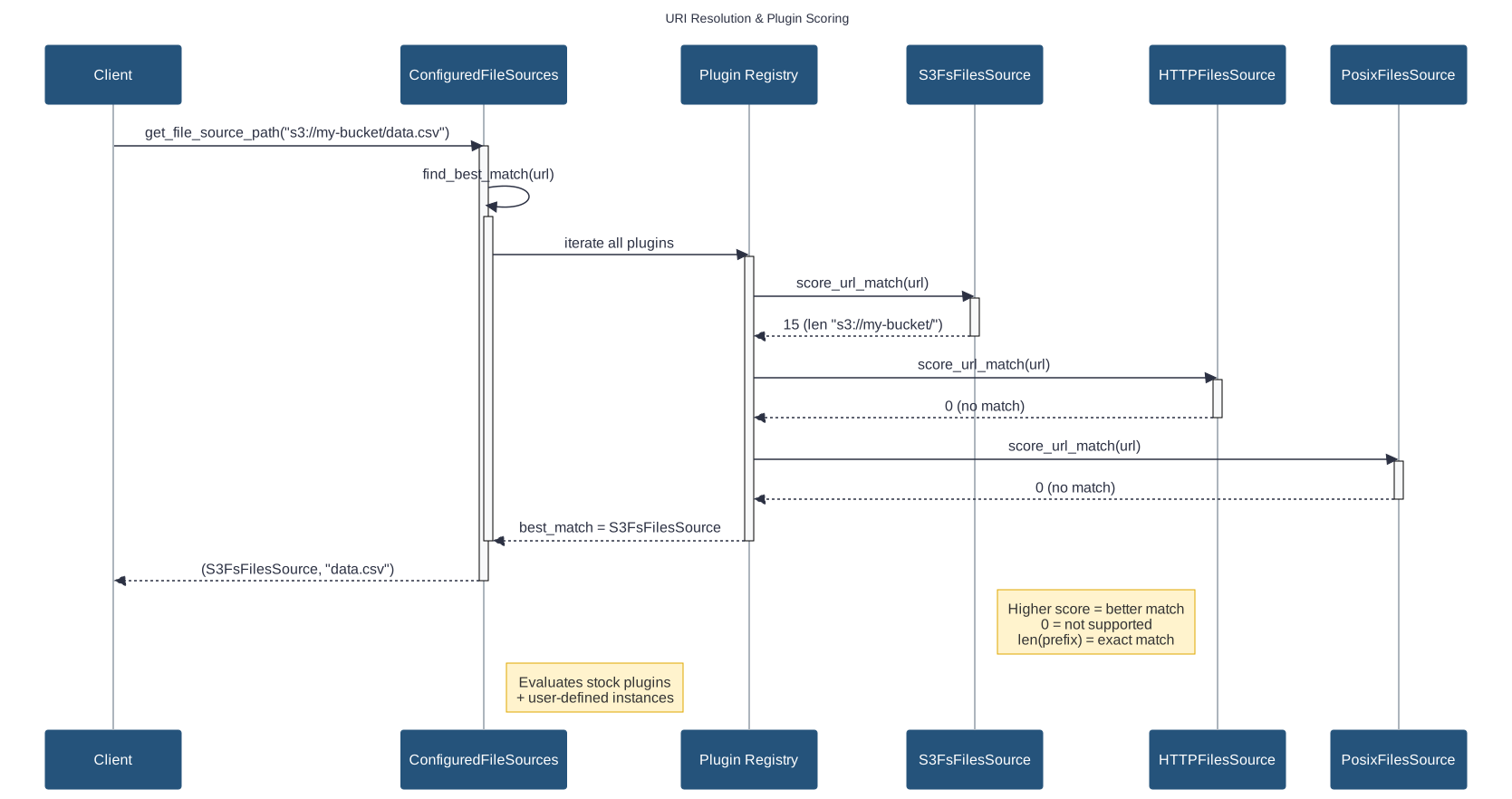
URI Scoring Example: S3 FilesSource
def score_url_match(self, url: str) -> int:
    if url.startswith("s3://"):
        bucket_name = self._get_config_bucket()
        if bucket_name:
            prefix = f"s3://{bucket_name}/"
            if url.startswith(prefix):
                return len(prefix)  # Exact bucket match
            # Prevent s3://my-bucket-prod matching s3://my-bucket
            elif url.startswith(f"s3://{bucket_name}") and url[len(f"s3://{bucket_name}")] != "/":
                return 0  # Boundary check failed
        return 1  # Generic S3 match
    return 0
Scoring algorithm: Returns 0 (unsupported) to URI length (exact match)
User Context & Access Control

Access Control Configuration
# Role-based access control
- type: s3fs
  id: restricted_bucket
  label: Restricted Project Data
  bucket: sensitive-data
  requires_roles: "data_access"
  requires_groups: "engineering OR research"

# Vault credential injection
- type: posix
  id: user_staging
  root: /data/staging/${user.username}
  writable: true
PyFilesystem2 Foundation
Older abstraction: PyFilesystem2 (fs) library for FTP, WebDAV, cloud SDKs
Server-side pagination via
filterdir(page=(start, end))Context manager pattern (filesystems opened/closed per operation)
Use cases: FTP, WebDAV, SSH protocols
class PyFilesystem2FilesSource(BaseFilesSource):
    def _list(self, path="/", recursive=False, user_context=None, opts=None):
        with self._open_fs(user_context) as fs:
            limit = opts.limit if opts else None
            offset = opts.offset if opts else 0

            # Server-side pagination for large directories
            if limit is not None:
                page = (offset, offset + limit)
                entries = list(fs.filterdir(path, page=page))
            else:
                entries = list(fs.scandir(path))

            return self._serialize_entries(entries), len(entries)
fsspec

fsspec Plugin Simplicity
Plugin authors implement only _open_fs() - base class handles the rest
class S3FsFilesSource(FsspecFilesSource):
    """S3-compatible storage via fsspec."""
    plugin_type = "s3fs"

    def _open_fs(self, user_context=None):
        config = self._get_config(user_context)
        return fsspec.filesystem(
            "s3",
            anon=config.anon,
            key=config.access_key_id,
            secret=config.secret_access_key,
            client_kwargs={"endpoint_url": config.endpoint_url},
        )
Base class provides: realize_to, write_from, list (with pagination), score_url_match
PyFilesystem2 vs fsspec
Feature |
PyFilesystem2 |
fsspec |
|---|---|---|
External Backends |
~20 |
40+ (Zarr, Git, HF, etc.) |
Galaxy Plugins |
12 (FTP, WebDAV, Dropbox, Drive, GCS…) |
6 (S3, Azure flat, HF) |
Pagination |
Native server-side |
Client-side after full listing |
Ecosystem |
7M downloads/mo |
543M downloads/mo |
fsspec born from Dask, used by pandas, xarray, zarr, PyArrow, HF Datasets
Downloads: pypistats.org, Dec 2025
Adding a Plugin: The Pattern

Key insight: FsspecFilesSource handles file operations—you implement only _open_fs()
Adding a Plugin: Steps
Create one file: lib/galaxy/files/sources/mycloud.py
Define Pydantic config models (template + resolved)
Create plugin class with
plugin_type(enables auto-discovery)Implement
_open_fs()returning fsspec filesystemRegister configs in
lib/galaxy/files/templates/models.pytype unionsAdd documentation to
doc/source/admin/data.md
Adding a Plugin: Example
# Pydantic models: template allows Jinja2, resolved requires concrete values
class MyCloudTemplateConfig(FsspecBaseFileSourceTemplateConfiguration):
    token: Union[str, TemplateExpansion, None] = None
    endpoint: Union[str, TemplateExpansion, None] = None

class MyCloudConfig(FsspecBaseFileSourceConfiguration):
    token: Optional[str] = None
    endpoint: Optional[str] = None

# Plugin class: only _open_fs() required
class MyCloudFilesSource(FsspecFilesSource[MyCloudTemplateConfig, MyCloudConfig]):
    plugin_type = "mycloud"              # Auto-discovery key
    required_module = MyCloudFS          # Optional: lazy import check
    required_package = "mycloud-fsspec"  # Optional: helpful error message

    template_config_class = MyCloudTemplateConfig
    resolved_config_class = MyCloudConfig

    def _open_fs(self, context, cache_options):
        config = context.config
        return fsspec.filesystem("mycloud", token=config.token)
Stock Plugins: Built-in Sources

Three sources in lib/galaxy/files/sources/galaxy.py extend PosixFilesSource:
Class |
Scheme |
Root Template |
|---|---|---|
|
|
|
|
|
|
|
|
|
POSIX Security & Behaviors
Symlink Protection (lib/galaxy/files/sources/posix.py)
if config.enforce_symlink_security:
    if not safe_contains(effective_root, source_native_path, allowlist=self._allowlist):
        raise Exception("Operation not allowed.")
safe_contains in util/path/__init__.py validates against symlink_allowlist
Atomic Writes (lib/galaxy/files/sources/posix.py)
target_native_path_part = os.path.join(parent, f"_{name}.part")
shutil.copyfile(native_path, target_native_path_part)
os.rename(target_native_path_part, target_native_path)
Move vs Copy: delete_on_realize config—FTP defaults to ftp_upload_purge (frees quota)
User-Driven Storage
Global Storage: Admin configures all sources globally in file_sources_conf.yml for all users
Problem: Doesn’t scale—diverse user needs (buckets, projects, credentials)
Solution: Template catalog + user instances
Admin provides templates
Users instantiate with their credentials
Allows multiple instances per template
Template Catalog Structure
# file_source_templates.yml (admin-configured)
- id: s3_template
  name: AWS S3 Bucket
  description: Connect to your AWS S3 bucket
  version: 1

  variables:
    bucket:
      label: Bucket Name
      type: string
    region:
      label: AWS Region
      type: string
      default: us-east-1

  secrets:
    access_key_id:
      label: Access Key ID
    secret_access_key:
      label: Secret Access Key

  configuration:
    type: s3fs
    bucket: "{{ variables.bucket }}"
    access_key_id: "{{ secrets.access_key_id }}"
Template System: Pydantic Models

Two-Tier Configuration
# Template-stage: allows Jinja2 expressions
class S3FsTemplateConfiguration(BaseModel):
    type: Literal["s3fs"]
    bucket: Union[str, TemplateExpansion]  # "{{ variables.bucket }}"
    access_key_id: Union[str, TemplateExpansion]

# Resolved-stage: concrete values only
class S3FsFilesSourceConfiguration(BaseModel):
    type: Literal["s3fs"]
    bucket: str  # Must be concrete string
    access_key_id: str
Three-stage validation: Template syntax → User input → Resolved config
Template Expansion: Jinja2 Resolution

Jinja2 Contexts
Four available contexts for variable resolution:
context = {
    "variables": variables,      # User form input
    "secrets": secrets,          # From Vault
    "user": user,                # Galaxy user (username, email, roles)
    "environ": os.environ,       # Environment vars
}
expanded = jinja_env.expand(template.model_dump(), context)
Custom filters: ensure_path_component, asbool
User Instance Lifecycle
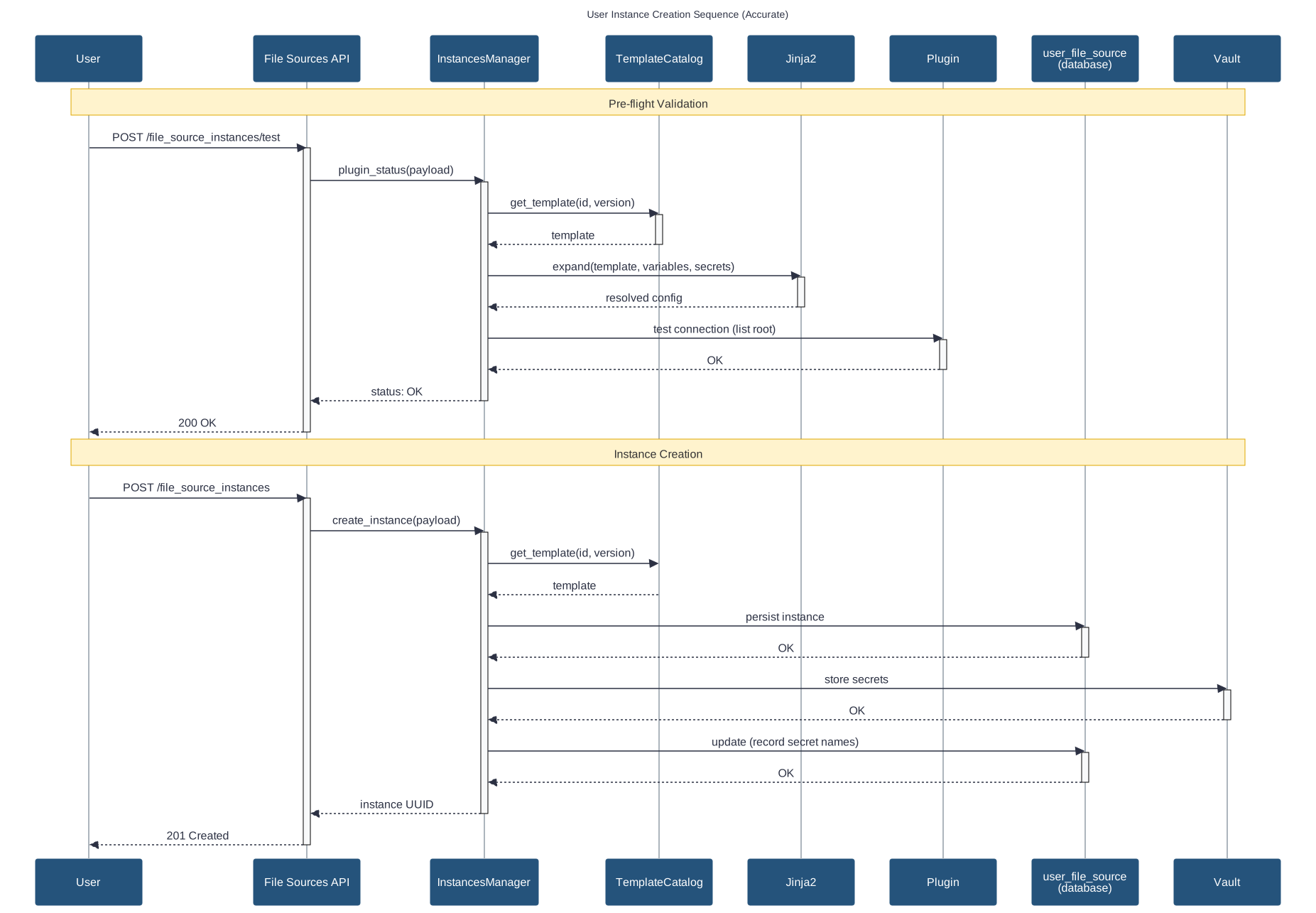
Instance CRUD Operations
Persistence: user_file_source table + Vault
Validation workflow:
Payload schema validation against template
Template variable/secret validation
Connection testing (root-level listing)
Persist to database + Vault
Security: Ownership validation, user-bound isolation
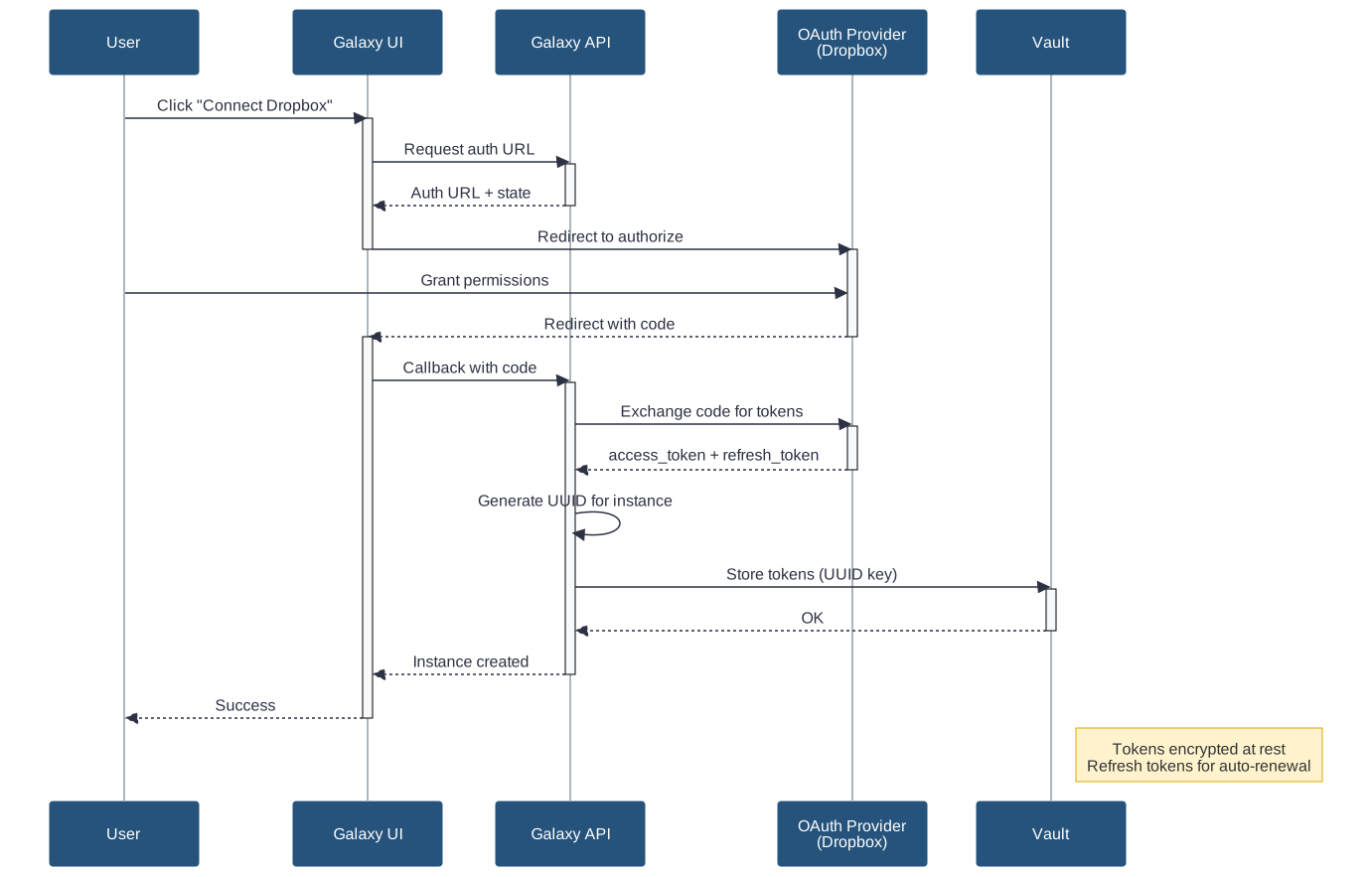
OAuth 2.0 Integration Pattern
Authorization flow:
User clicks “Authorize” → Galaxy generates auth URL + pre-generates UUID
Redirect to provider (Dropbox, Google) → User grants permissions
Provider callback with code → Galaxy exchanges for tokens
Tokens stored in Vault → Instance created
# Dropbox OAuth template
- id: dropbox_oauth
  name: Dropbox
  secrets:
    client_id: ...
    client_secret: ...
  configuration:
    type: dropbox
    access_token: "{{ secrets.access_token }}"
    refresh_token: "{{ secrets.refresh_token }}"
OAuth 2.0 Authorization Flow
URL Unification
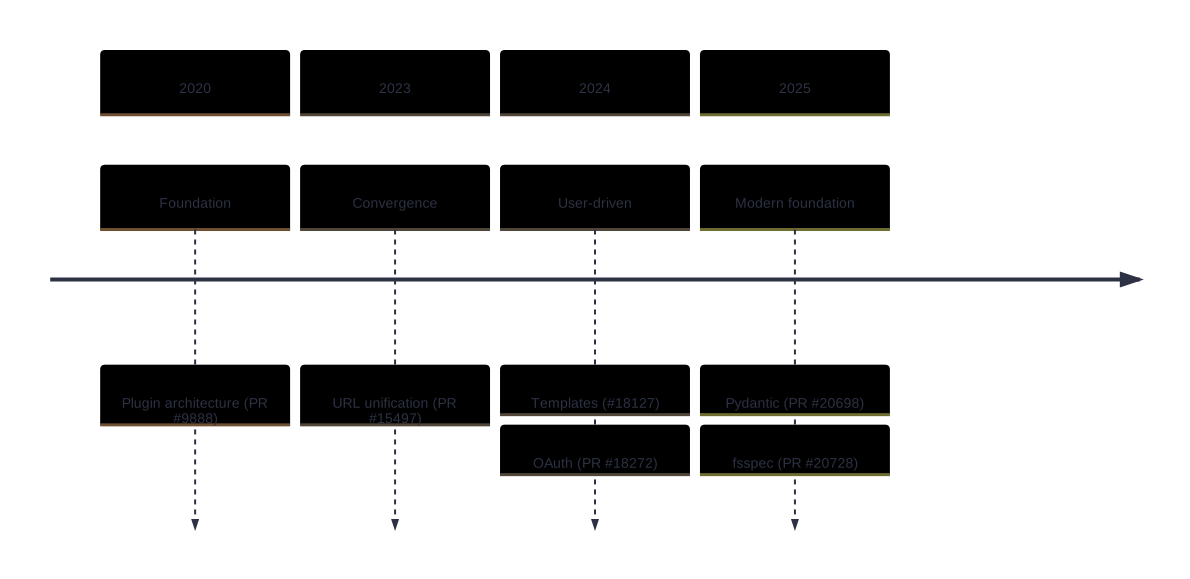
Before PR #15497: Separate code paths
HTTP/FTP: Custom URL handler
S3: Separate S3 handler
DRS: Separate DRS handler
File sources:
gxfiles://only
After: All URLs routed through file sources
Unified authentication
url_regexfor site-specific handlershttp_headersfor Bearer tokens, Basic Auth
URL Routing with Credentials
# Site-specific URL routing with auth
- type: http
  id: internal_api
  label: Internal Data API
  url_regex: "^https://api\\.internal\\.org/"
  http_headers:
    Authorization: "Bearer ${secrets.api_token}"

- type: http
  id: public_http
  label: Public HTTP
  url_regex: "^https?://.*"
  # No auth - public access
URLs automatically route to correct handler based on scoring
API Integration
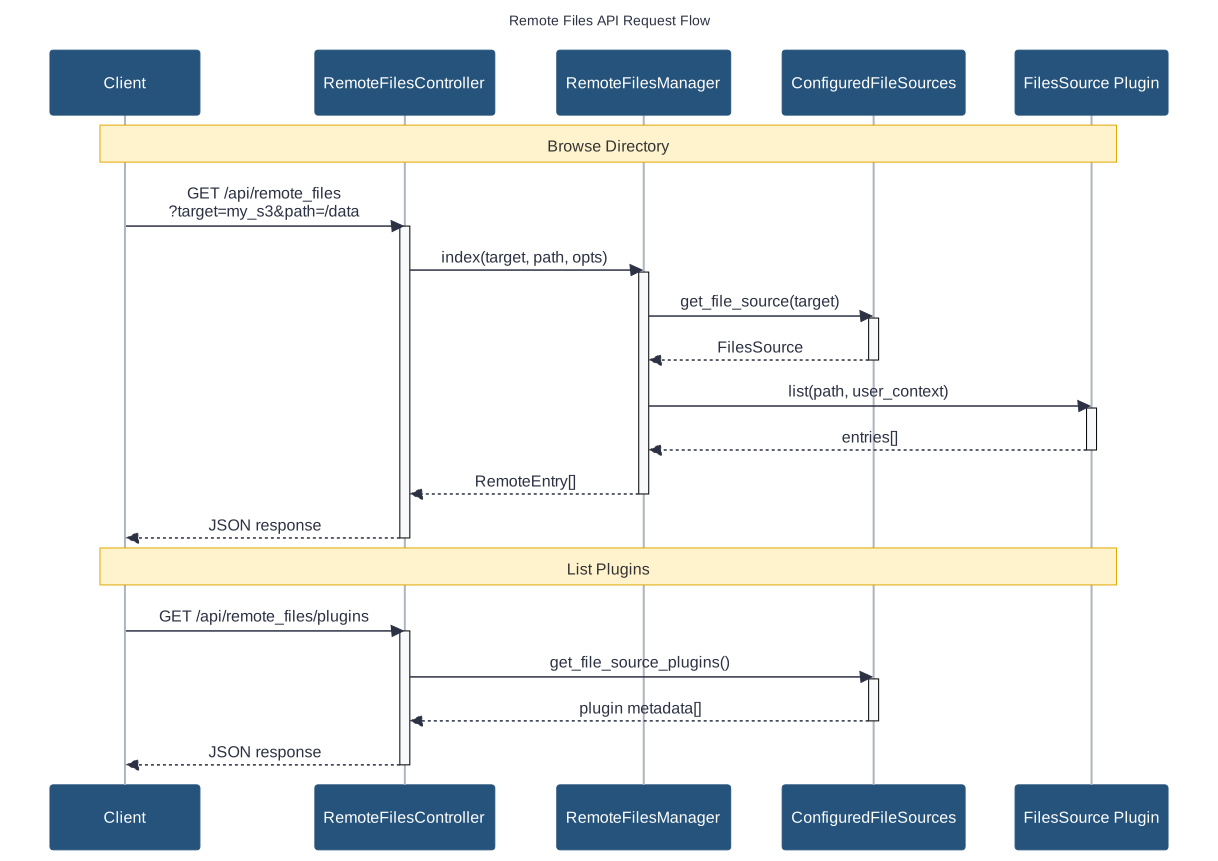
API Endpoints
Remote Files API (browsing):
GET /api/remote_files- Directory listing with paginationGET /api/remote_files/plugins- Plugin enumerationPOST /api/remote_files- Entry creation (writable sources)
File Sources API (templates/instances):
GET /api/file_source_templates- Template catalogPOST /api/file_source_instances- Create instanceGET /api/file_source_instances- List user instancesPUT/DELETE /api/file_source_instances/{uuid}- Update/delete
Evolution Timeline
Key Takeaways
File Sources provide hierarchical file access for import/export
User-defined templates enable personal cloud storage connections
fsspec enables easy integration of 40+ storage backends
OAuth 2.0 supports seamless cloud service authentication