# Galaxy Task Management with Celery *The architecture surrounding Galaxy task management.* --- ### Learning Questions - How does Galaxy handle long-running tasks? - When should I use Celery? - How do I create a new Galaxy task? --- ### Learning Objectives - Understand when to use tasks vs web requests - Learn how to declare Celery tasks - Use Pydantic for task serialization - Understand best practices --- class: center  --- class: enlarge120 ### Avoid Doing Work in Web Threads Web servers are a terrible place to do work. Traditional Python WSGI servers are meant for processing requests that take less a minute - they are meant for long running tasks. This request/response cycle is inappropriate for deleting all the files in a history, submitted 10,000 batch jobs for a collection, building a zip file for a library folder. --- class: center  --- class: center  ??? Handling a task description off to Celery allows the web server to respond right away and avoid various hacks. Celery is meant for these long running tasks and has a set of operations for handling them properly. --- class: center 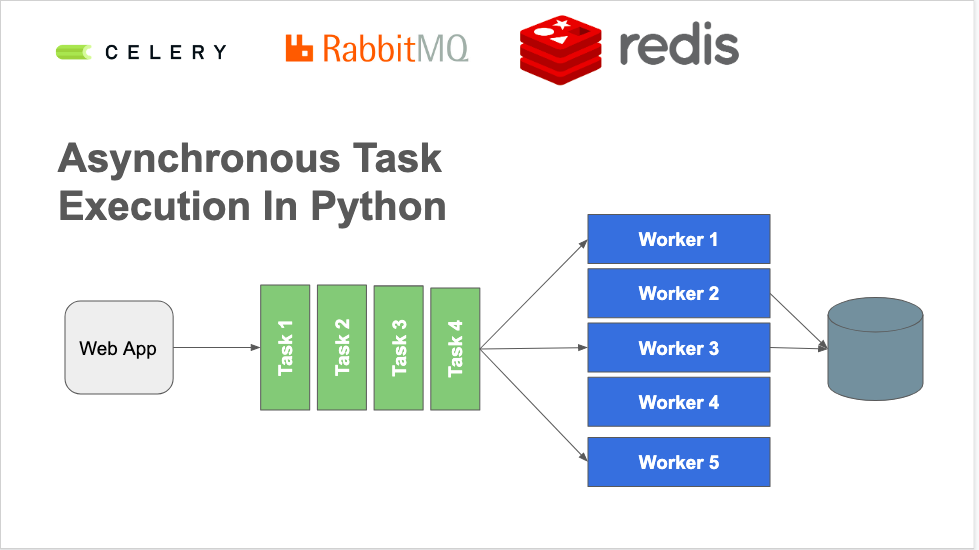 --- class: enlarge150 ### Downsides of Celery Adds more complexity to deploying Galaxy. Celery needs to be available to Galaxy at runtime, production Galaxy instances need a broker and a backend. --- class: reduce90 ### Gravity + Celery .code[``` $ galaxy Registered galaxy config: /home/nate/work/galaxy/config/galaxy.yml Creating or updating service gunicorn Creating or updating service celery Creating or updating service celery-beat celery: added process group 2022-01-20 14:44:24,619 INFO spawned: 'celery' with pid 291651 celery-beat: added process group 2022-01-20 14:44:24,620 INFO spawned: 'celery-beat' with pid 291652 gunicorn: added process group 2022-01-20 14:44:24,622 INFO spawned: 'gunicorn' with pid 291653 celery STARTING celery-beat STARTING gunicorn STARTING ==> /home/nate/work/galaxy/database/gravity/log/gunicorn.log <== ...log output follows... ```] ??? Start Galaxy with Gravity starts not only the Python web server (gunicorn) running the Galaxy application but also celery and required services. --- class: center  --- class: enlarge150 ### Declaring a Task - Placed in `galaxy.celery.tasks`. - We've placed a layer around Celery to mirror what we're with API endpoints. - Typed functions with Pydantic inputs implicitly mapped. - Implicit type based dependency injection from Galaxy's DI container (using Lagom) - Feels a lot like writing an API endpoint. --- ### A Simple Task .code[``` @galaxy_task( ignore_result=True, action="setting up export history job" ) def export_history( model_store_manager: ModelStoreManager, request: SetupHistoryExportJob, ): model_store_manager.setup_history_export_job(request) ```] --- class: reduce70 ### The `galaxy_task` Decorator .code[```python @galaxy_task( ignore_result=True, action="setting up export history job" ) def export_history( model_store_manager: ModelStoreManager, request: SetupHistoryExportJob, ): model_store_manager.setup_history_export_job(request) ```] - `galaxy_task` is a wrapper around Celery's `task` decorator - Wrap a simple function to turn it into a task. - Ensure all inputs are JSON serializable or components in Galaxy's dependency injection container --- ### Celery and Pydantic The `request` argument to `export_history` is a Pydantic model type named `SetupHistoryExportJob`. These are mostly defined in `galaxy.schema.tasks`. .code[```python from pydantic import BaseModel class SetupHistoryExportJob(BaseModel): history_id: int job_id: int store_directory: str include_files: bool include_hidden: bool include_deleted: bool ```] --- class: enlarge200 ### Celery and Pydantic - Implementation - Custom JSON encoding and decoding to adapt Celery to Pydantic. - Implemented in `galaxy.celery._serialization`. - Inject `__type__` and `__class__` attributes into JSON description. - `@galaxy_task` decorator sets Celery `serializer` attribute. --- ### Celery and Dependency Injection .code[``` @galaxy_task( ignore_result=True, action="setting up export history job" ) def export_history( model_store_manager: ModelStoreManager, request: SetupHistoryExportJob, ): model_store_manager.setup_history_export_job(request) ```] - The type declaration on `model_store_manager` of `ModelStoreManager` causes the Galaxy manager object of this class to be passed to the function when the task is running. - Client does not need to have any knowledge of this class. --- ### Executing Tasks from Galaxy See `lib/galaxy/tools/imp_exp/__init__.py`: .code[```python from galaxy.schema.tasks import SetupHistoryExportJob ... request = SetupHistoryExportJob( history_id=history.id, job_id=self.job_id, store_directory=store_directory, include_files=True, include_hidden=include_hidden, include_deleted=include_deleted, ) export_history.delay(request=request) ```] The delay method is created implicitly from the `galaxy_task` decorator. --- class: enlarge200 ### Best Practices - Place tasks in `galaxy.celery.tasks`. - Keep the tasks as thin as possible (ideally simply delegate inputs to a manager or another Galaxy component independent of Celery). - Ensure required/injected Galaxy components as small and decomposed as possible. - Place new request definition argument types in `galaxy.schema.tasks`. --- ### Existing Tasks Success Stories --- class: enlarge150 ### PDF Export Problems - We added PDF export of Galaxy Markdown using weasyprint - Generation of PDF took too long, feature was quite unstable --- class: enlarge150 ### Short Term Storage (STS) - A Galaxy component for managing user downloadable files that only need to exist for a little time. - Traditionally, these kind of files have required a lot of hacking to do well in Galaxy (tracking transient request-like stuff in data model, etc..) - Not just unoptimized by default, but unusable - Required customizing nginx routes, special web server plugins, etc... https://github.com/galaxyproject/galaxy/pull/13691 --- class: enlarge150 .code[``` class GeneratePdfDownload(BaseModel): short_term_storage_request_id: str basic_markdown: str document_type: PdfDocumentType ```] --- ### Robust PDF Export .code[```python from galaxy.managers.markdown_util import generate_branded_pdf @galaxy_task( action="preparing Galaxy Markdown PDF for download" ) def prepare_pdf_download( request: GeneratePdfDownload, config: GalaxyAppConfiguration, short_term_storage_monitor: ShortTermStorageMonitor, ): generate_branded_pdf( request, config, short_term_storage_monitor, ) ```] --- class: enlarge120 ### Exporting Histories, Invocations, Libraries .code[``` @galaxy_task( action="generate and stage a workflow invocation store for download" ) def prepare_invocation_download( model_store_manager: ModelStoreManager, request: GenerateInvocationDownload, ): model_store_manager.prepare_invocation_download( request ) ```] https://github.com/galaxyproject/galaxy/pull/12533 --- class: enlarge150 ### Optimized Uploads - Decomposed job handling, precursor to migrating more job components to Celery - Converting uploads to tasks signficantly sped up running Galaxy tests - API tests went from 2.5 hours to 50 minutes - Amazing speed up for small jobs - Exploring task composition https://github.com/galaxyproject/galaxy/pull/13655 --- ### Uploads - Task Composition See `lib/galaxy/tools/execute.py` .code[``` async_result = ( setup_fetch_data.s(job_id, raw_tool_source=raw_tool_source) | fetch_data.s(job_id=job_id).set(queue="galaxy.external") | set_job_metadata.s( extended_metadata_collection="extended" in tool.app.config.metadata_strategy, job_id=job_id, ).set( queue="galaxy.external", link_error=finish_job.si(job_id=job_id, raw_tool_source=raw_tool_source) ) | finish_job.si(job_id=job_id, raw_tool_source=raw_tool_source) )() ```] --- class: enlarge200 ### Batch Operations Task-based operations enable the most expensive of the new history's batch operations. - Changing datatypes - Purging datasets https://github.com/galaxyproject/galaxy/pull/14042 --- class: enlarge200 ### Future Work - *Migrating tool submission to tasks* - Workflow scheduling - Importing shared histories https://github.com/galaxyproject/galaxy/issues/11721
Use arrow keys to navigate • P for presenter mode • F for fullscreen